The decision workspace, the connected views, a worked decision, the console as it runs, what is true today and the next forced decision. Everything on this page runs on a fictional health plan’s synthetic data.
Inside the workspace
Try the decision workspace.
Price a change against its alternatives, have a second person approve it, and compare the configuration your gateways report back. Review financial evidence on its own source and period.
Follow spend into teams and workflows. Inspect model choices, sensitive-data controls and the decisions behind the numbers.
ARC1 views, shown with synthetic data from a fictional health plan.
One coding workflow · synthetic example
Decide whether a cheaper model should proceed.
Compare supplied observations for the same 100 synthetic requests in a bounded coding task. The workflow owner’s acceptance check covers the correct result, required format and stated constraints. These three possible results use ARC1’s built-in comparison engine.
Same-task baseline95 of 100 tasks accepted$0.010526 per accepted result · 180 ms at the 95th percentile
Limits set before collecting the pairsAt most 2 fewer accepted tasks per 100At least 10% lower unit cost · errors at most 2% · latency at most 200 ms
This candidate misses acceptance, error and latency limits.
Limits met
Accepted work costs less within these limits.
94%candidate task acceptance 1 percentage point below baseline
Minimum 93%
Cost per accepted result
$0.006383 39.4% lower
Request errors
1% within limit
95th-percentile latency
160 ms within limit
Review the cohort and task-acceptance labels before a separately approved change.
Incomplete evidence
Missing observations leave the decision open.
Unknowncandidate task acceptance 1 successful request has no task-acceptance label
Task acceptance cannot be compared
Cost per accepted result
Unknown 1 missing cost reading
Request errors
1% within limit
95th-percentile latency
Unknown 1 missing latency reading
Complete the missing evidence in a new comparison before deciding.
Keep the comparison with its reviewed decision. Inspect model eligibility approval, target configuration and follow-up observations as separate evidence; export the exact comparison for the handoff.
Built-in synthetic paired observations v1, for 1–2 January 2026. All acceptance labels, costs, latency and errors are invented fixture inputs; no provider or collector is called. Each scenario has 100 paired requests and the same baseline, cohort, rubric and configurations. Cost per accepted result counts every request in the comparison.
Descriptive comparison results do not authorize a route change or establish production savings. Model permission, observed target configuration and financial review remain separate.
The console, as it runs
Follow the evidence.
Six screens from the ARC1 console on a fictional health plan’s synthetic data: compared options, spend, configuration readback, results, receipts and the administrator’s Flow view.
Choose a screen / Swipe to explore
01 / 06
01 / Decisions
A cheaper option still has to meet the limits.
Three retained comparisons each use 200 paired synthetic requests. Two meet their registered limits. The compact option misses quality, errors and latency, so its lower price is not enough. Decisions preserves review history; pending approvals and Needs you identify work awaiting action.
Synthetic health plan · synthetic data
02 / Spend
Spend, by the teams that own it.
Provider bills, gateway readings and agents’ own reports stay separate sources, mapped to departments, teams and workflows. What no source explains stays in view as a remainder.
Synthetic health plan · synthetic data
03 / Enforcement
Approved policy, compared with what each target reports.
One approved policy is compiled for supported gateways and coding-agent hooks, and each target’s reported configuration is compared with the signed version. A match is configuration evidence; enforcement needs its own request records.
Synthetic health plan · synthetic data
04 / Results
Results, held to the ledger.
A business case names its owner and locks its baseline at approval. Forecast, provisional value and finance-approved allocation stay separate, and a different person with finance authority closes the month.
Synthetic health plan · synthetic data
Cropped from the full screen
05 / Evidence
Evidence your auditor can verify.
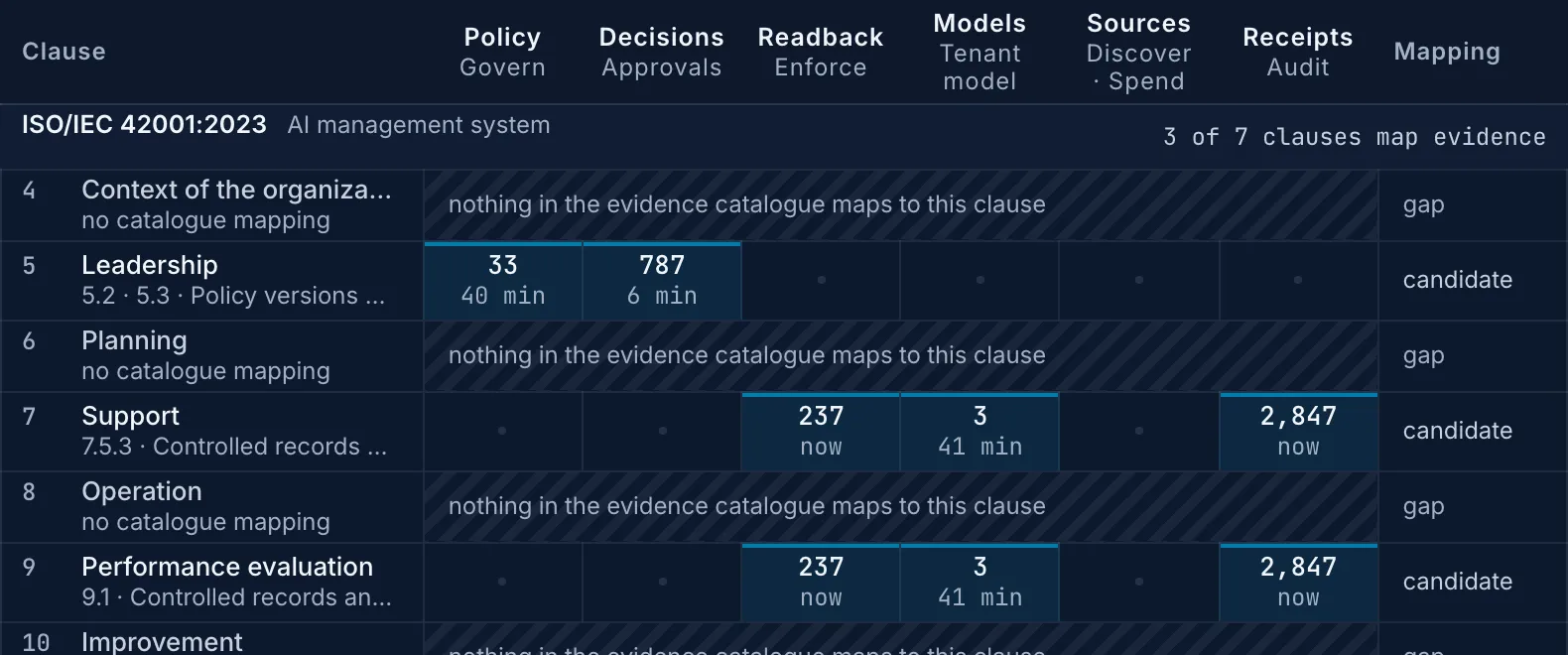
Every proposal, approval and policy change is an Ed25519-signed receipt, chained to the one before it and verifiable offline. A mapping to ISO/IEC 42001 or the NIST AI RMF is evidence for your auditor, never a conformity finding.
Synthetic health plan · synthetic data
Cropped from the full screen
06 / Administrator
See how the estate is configured.
The administrator’s Flow view places callers, configured gateways and model destinations together, with ARC1’s evidence and approved configuration paths beside them. Pair this view with Enforcement to inspect each target’s reported configuration. The diagram describes architecture; it does not trace individual requests.
Synthetic health plan · synthetic data
Stated as it stands
What is true today.
What runs, what has been tested and what is planned, in the same words the roadmap uses.
Everything shown here runs on our hosted reference deployment, on a fictional health plan’s synthetic data. No customer has closed a month in ARC1 yet.
One gateway, in the lab
Kong Gateway, open-source edition 3.9.3, has been exercised against a running node in our lab for policy apply, readback and drift recovery; that run did not establish successful model inference. Every other connector is tested against the vendor’s documented interface.
Metadata only
Requests never pass through ARC1. The usage reporting contract excludes prompts, responses, source code and local paths.
Separate proposal and approval
An administrator proposes a policy and a second person approves it. A different person with finance authority closes the month. The deployment signs the receipt, preserving who acted.
Signed receipts
Every proposal, approval and policy change is kept as an Ed25519-signed receipt, chained to the one before it and verifiable offline.
In your environment
One deployment for one organization, in your environment, signed in through your identity provider.
One record
Each decision retains its compared options, separate approvals, configuration observations and available follow-up. Download its decision packet; financial review keeps its own source and period, and missing evidence links remain explicit.
Planned
Pricing the vendor’s default as its own option, and recording outcome counts with the decision.
The next forced decision
Selected Microsoft Foundry models retire on 19 November.
For the listed base model versions, Microsoft Foundry moves o1, o3 and o3-pro deployments to gpt-5.6-sol, and o3-mini and o4-mini to gpt-5.6-terra, by default, on Standard, Global Standard and Data Zone Standard deployments. Provisioned deployments are not upgraded: unless they are migrated, they stop answering when the model retires. The gpt-5, gpt-5-mini and gpt-5-nano (2025-08-07) versions follow on 9 February 2027, with no replacement named yet.
A retirement review prices the default on your highest-volume workflow’s token mix against two alternatives, registers quality and service limits before anyone sees results, and leaves the decision on the record for your controller and auditor.
Retirement dates in Microsoft Foundry, selected base model versions
Model
Retires
Default replacement
o1, o3, o3-pro
19 Nov 2026
gpt-5.6-sol
o3-mini, o4-mini
19 Nov 2026
gpt-5.6-terra
gpt-4o (2024-05-13)
9 Dec 2026
gpt-5.6-sol
gpt-5, gpt-5-mini, gpt-5-nano
9 Feb 2027
None named yet
Listed base model versions: o1 (2024-12-17), o3 (2025-04-16), o3-pro (2025-06-10), o3-mini (2025-01-31), o4-mini (2025-04-16), gpt-4o (2024-05-13), and gpt-5, gpt-5-mini and gpt-5-nano (all 2025-08-07).
Source: Microsoft Foundry model retirement schedule and lifecycle policy (schedule dated 21 September 2026, read 6 October 2026). Automatic upgrades roll out by region on Standard, Global Standard and Data Zone Standard deployments unless automatic upgrades are disabled for that deployment; provisioned deployments are migrated by hand.
A wider horizon.
See the record on your next model change.
A 30-minute walkthrough on our hosted reference deployment, with synthetic data. If a retirement or another model change is coming, we use it as the example; a design partnership then runs it with agreed inputs and milestones. Partners and investors use the same form.
Product screens: the ARC1 console with a fictional health plan’s synthetic data (demonstration), every one captured 8 October 2026 in the dark appearance from a local build of the same release; the small screens above are regions of those same captures. The Results and Evidence screens are cropped to the trace and the evidence map; the decision evaluation shows three retained synthetic comparisons, and the administrator Flow view is a schematic with its reported-usage strip cropped out. Each full screen is a press away. The interactive workspace, the connected views and the worked decision are illustrations on synthetic fixtures; nothing on this page reads a live environment.
Where does ARC1 sit?
Synthetic data · Sep 4 – Oct 3, 2026
Requests stay on their configured path. ARC1 reads evidence and prepares approved changes for supported targets.
Request path
Configured routes
Callers keep their gateway or native path
Evidence
Beside the path
Independent usage, work and finance sources
Control
Approved changes
Compiled for supported gateways and hooks
Callers
People in a browser, applications and agents, and developers on Claude Code and Codex (1,212 managed machines)
Model requests → configured route; alternatives depend on the caller
Configured gateways
KongAzure API Management
Model destinations · schematic
AnthropicOpenAIAzure OpenAIAWS BedrockGoogle Vertex AI
Direct / native provider path · where configured. No route shares are established.
ARC1, beside the path
Reads gateway token metrics and logs, provider usage and billing, machine reports, Entra ID, GitHub and Azure DevOps work items, finance imports
Evidence in → ARC1 from supported sources
ARC1 → supported gateways / hooks approved target-specific changes, not model payloads
Optional ARC1 Gateway is a separate runtime; pre-request decisions are control interactions.
Source coverage: this synthetic cohort has a 4.1% billed-minus-gateway token difference; it does not establish a bypass route.
Who spent it, and on what?
Synthetic data · Sep 4 – Oct 3, 2026
$3.90M went to AI in the last 30 days, and $3.86M of it (98.9%) has an owning team.
Provider-billed AI
$3.90M
Last 30 days · synthetic cohort
Mapped to a team
98.9%
Ownership attribution, not source coverage
No owning team
$41.8K
Keys and subscriptions needing attribution
Department, team, project
Spend, billed
Gateway-measured
Machine-reported
Billed minus gateway
Budget pace
Claims & Payment Integrity
$1,086,300
$1,054,880
$95,180
$31,420
97% of $1.12M97% of $1.12M
Risk Adjustment & Quality
$812,400
$793,440
$22,340
$18,960
103% of $790K, over by $22.4K103% of $790K
Clinical & Care Management
$668,900
$644,790
$40,270
$24,110
96% of $700K96% of $700K
Member Services & Contact Center5 teams
$486,150
$473,310
$45,060
$12,840
103% of $470K, over by $16.1K103% of $470K
IVR & Self-Service Engineeringopened
$214,380
$211,260
$14,530
$3,120
Member support lineworkflow
$151,240
$151,240
–
–
Medicare contact center lineworkflow
$48,610
$45,490
–
$3,120
ivr-flows repositoryproject · coding agents
$14,530
$14,530
$14,530
–
Member Services Tier 2 Technology
$98,640
$95,780
$9,410
$2,860
Member Correspondence Engineering
$71,250
$68,940
$8,120
$2,310
2 more teams
$101,880
$97,330
$13,000
$4,550
5 more departmentsEnterprise, Digital, Data, Provider, Enrollment
$805,940
$763,200
$394,830
$42,740
96% of $840K96% of $840K
No owning teamkeys and subscriptions mapped to no team
$41,800
$15,500
–
$26,300
no budget
All AI spend
$3,901,490
$3,745,120
$597,680
$156,370
owned spend 98% of $3.92M98% of budget
Gateway-measured
$3,745,120
Machine-reported
$597,680
Billed with no gateway reading
$156,370
Three separate readings, never added.
Three readings side by side, never added. Gateway-measured is Kong by route and Azure API Management by subscription and product; machine-reported is Claude Code and Codex, by person, team, project and repository. Remainder is billed minus gateway-measured: it can include calls that reached a provider with no gateway, and is not proof of them.
Which workflow should we evaluate?
Synthetic data · Sep 4 – Oct 3, 2026
Candidate repricing at unchanged volume differs by $1.24M a month. $585K relates to 3 workflows with supplied quality samples; the owner must evaluate quality, errors and latency before a change.
Candidate repricing
$1.24M
Monthly difference at unchanged volume
With quality samples
$585K
3 workflows · owner evaluation required
Evidence boundary
Not achieved savings
Evaluate quality, errors and latency first
Workflow, owner team
Model in use
Per outcome, reported → candidate
Monthly repricing difference
Supplied evaluation sample
HCC chart reviewRisk Adjustment Analytics
claude-sonnet-5$526K a month
$0.665 → $0.262per chart · claude-haiku-4-5
$318,773
Supplied sample: 96.1% agree with coders, 1,200 charts
Professional claim coding checksClaims Platform Engineering
claude-sonnet-5$190K a month
$0.057 → $0.024per claim · claude-haiku-4-5
$109,989
Quality not measured
5 more workflowseach $88.0K a month or less
$358,224
1 measured, 4 not measured
10 workflows with counted outcomes
$1,236,475
3 measured
Of which, the 3 with measured quality
$585,235
Measured
What moved the bill
$3.72M → $3.90M (+$186,400) on the previous 30 days
Volume+$142,300
Retries+$31,800
Tokens/outcome+$24,600
Model mix−$18,900
Cache−$6,200
Price+$12,800
Next 30 days
$4.04M80% range $3.89M – $4.27M, learned on synthetic workloads
Which model is doing which kind of work?
Synthetic data · Sep 4 – Oct 3, 2026
$388K of the $1.39M spent on top-tier models (28%) is classified as structured decision and extraction from usage shape. That suggests a smaller-model evaluation, not proof of quality or fitness.
Top-tier candidates
$388K
Structured decision and extraction usage shape
Reported work
5 classes
Classification does not establish model fitness
Next step
Evaluate a smaller tier
Keep the workflow’s acceptance criteria
Classified from reported usage shape. Highlighted cells are candidates to evaluate against the workflow’s acceptance criteria.
Reported usage-shape class
Top tierclaude-opus-5-5, gpt-5.5
Mid tierclaude-sonnet-5, gpt-5.4
Small tierclaude-haiku-4-5, gpt-5.4-mini
All tiers
Candidate to evaluate
Structured decision
$296K7.6%
$303K7.8%
$114K2.9%
$713K
Small tier candidate
Extraction
$91.7K2.3%
$318K8.2%
$96.9K2.5%
$507K
Small tier candidate
Drafting and summarising
$52.3K1.3%
$387K9.9%
$48.5K1.2%
$487K
Mid tier candidate
Multi-step reasoning
$713K18.3%
$862K22.1%
$21.6K0.6%
$1.60M
Top or mid candidate
Coding
$239K6.1%
$335K8.6%
$23.9K0.6%
$598K
Mid tier candidate
All work
$1.39M35.7%
$2.20M56.5%
$305K7.8%
$3.90M
Where the approved-models rule is pinned
Configured gateways route requests. ARC1 prepares supported model-policy changes and compares readback with approved configuration; it does not infer request execution from it.
Point
Approved
Configuration / report
How
Kong route claims-coding-checks
Anthropic · claude-sonnet-5
Matches
Route pinned to one provider and model
Kong route pa-criteria-review
Anthropic · claude-opus-5-5
Matches
Route pinned to one provider and model
Azure API Management member-support-line API
Azure OpenAI · gpt-5.4
Matches
API bound to its approved backend
Claude Code 1,064 machines
The approved list
opus 40% · sonnet 56% · haiku 4% of spend, reported
Machine-reported model mix; allowed-model settings do not prove route pinning
Is sensitive data being stopped, and where?
Synthetic data · Sep 4 – Oct 3, 2026
Managed machines reported 3,412 sensitive-data detections in the last 30 days. Rules set to enforce blocked 388 of them; the other 3,024 came from rules running in observe or warn.
Machine detections
3,412
Last 30 days · machine-reported counts
Blocked by enforce rules
388
Other rules remain in observe or warn
Content boundary
Counts, not prompts
Gateway detections stay in gateway logs
Reported by the coding-agent hooks
Each rule runs in the mode its owner set. Version 7 moved the credentials rule to enforce on Oct 1.
Category
Observed
Warned
Blocked
Detections
Health identifiersmember ID, MBI, MRN
812
694
176
1,682
Personal identifiersSSN, date of birth with name
531
462
98
1,091
Credentialskeys, tokens, connection strings
297
228
114
639
All categories
1,640
1,384
388
3,412
Claude Code hook: observe, warn or block
Codex hook: observe, warn or block
Kong: blocks matching structured patterns
Azure API Management: blocks matching structured patterns
ARC1 receives counts from the machines, not content.
Teams with the most detections
Detections
Blocked
Claims Data Engineering
412
38
Clinical Informatics & Interoperability
356
71
Risk Adjustment Analytics
298
24
Analytics Engineering
251
19
Supported controls at each enforcement point
Point
What it does on a match
Configuration version
Claude Code hook1,064 machines
Configured hook events observe, warn or block per rule
v7 on 1,031 · v6 on 33
Codex hook148 machines
Configured hook events observe, warn or block per rule
v7 on 148
Kong 3.9.3East US 2
Blocks a request that matches by shape
v7
Azure API ManagementEast US 2 · Central US
Enforces by shape on the request
v7 · v6 in Central US
Hooks and gateways block sensitive identifiers in prompts, within what each target supports. Open-source Kong blocks; redaction is a Kong Gateway Enterprise 3.13 feature. 61 of the 388 blocks came from Codex machines.
ARC1 receives counts per rule and minute from the machines, not content. Gateway detections stay in the gateway's own logs.
Does configuration match the approved policy?
Synthetic data · Sep 4 – Oct 3, 2026
Policy version 7 matches configuration on 3 of 5 targets. 33 Claude Code machines still report version 6, and the Central US Azure API Management plan is awaiting approval.
Configuration matches
3 of 5
Compared with approved version 7
Signed receipts
186
Proposals, approvals and policy changes
Evidence boundary
Readback only
Request evidence establishes enforcement
Version 7, from proposal to read back
Illustrative activity · fixed synthetic history
Sep 29 14:12Proposed · Platform administratorCredentials rule to enforce on coding agents; two models added to the approved list
Sep 30 09:06Compiled · ARC1Five plans: Kong, Azure API Management in two regions, Claude Code, Codex
Sep 30 11:20Applied · Gateway ownerKong plan approved and applied
Oct 1 10:02Applied · Gateway ownerAzure API Management East US 2
Oct 1 10:30Distributed · Endpoint ownerClaude Code and Codex hook settings
Oct 3 16:40Read back · ARC1Target configuration or reported settings compared with v7
Targets, as last read back
Target
Readback version
Read back
State
Kongopen-source 3.9.3 · East US 2
v7
Oct 3 16:40
Matches
Azure API ManagementEast US 2
v7
Oct 3 16:40
Matches
Azure API ManagementCentral US
v6
Oct 3 16:40
Awaiting approval of its v7 plan
Claude Code machines1,031 of 1,064 on v7
v7 · v6 on 33
Oct 3 16:35
Drifted on 33 machines
Codex machines148 of 148 on v7
v7
Oct 3 16:35
Matches
Configuration observed: a matching read back shows the configuration read from a target. It does not by itself show that traffic was enforced. Enforcement needs separate request evidence.
MCP servers the coding agents call
26 approved · 4 awaiting a decision · 2 refused
Signed, chained receipts this window
186 proposals, approvals and policy changes
What supports the financial claim?
Synthetic data · Sep 4 – Oct 3, 2026
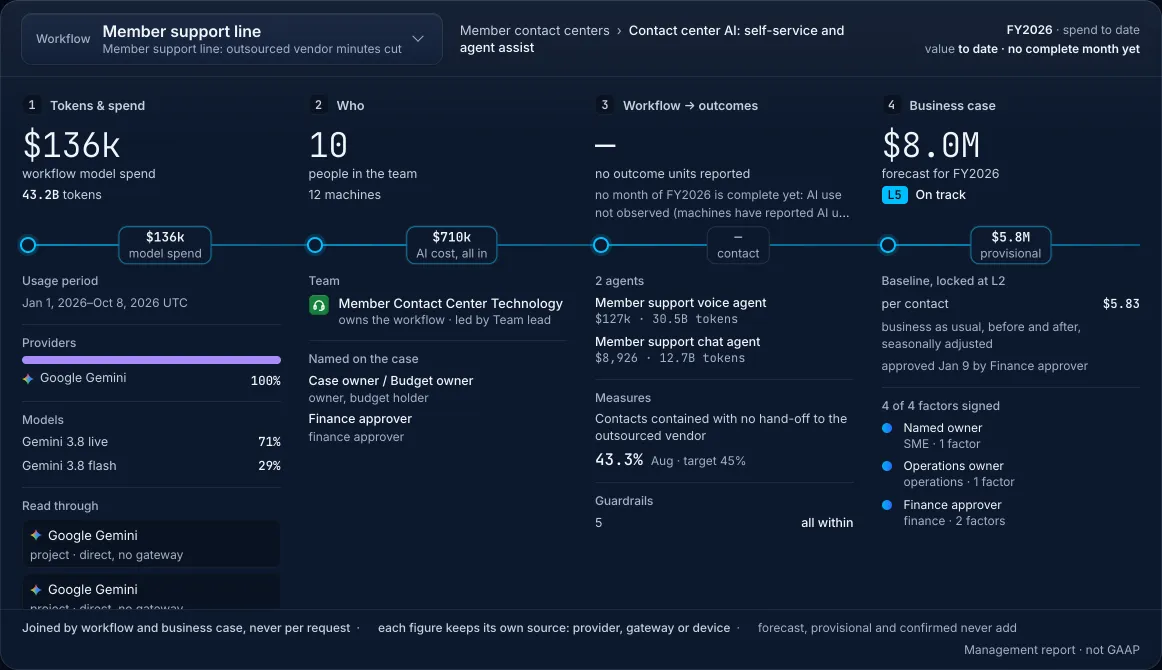
The member support line reports $0.67 in model spend per resolved contact. Its $7.05 outsourced baseline uses a different outcome and cost scope. Finance’s $7.20M allocation is reviewed attribution, not causal proof.
Model cost / resolved
$0.67
Measured unit economics · model spend only
Finance allocation
$7.20M
Separate reviewed attribution · Jan – Aug 2026
Ongoing overlap
$230K / mo
Declared cost; reduction needs ledger evidence
Member support line · IVR & Self-Service Engineering · Member Services & Contact Center
01 / Measured unit economics
Model spend, 30 days$151,24038.8B tokensgpt-5.4 on Azure OpenAI, through Azure API Management
Outcomes counted225,800contacts resolved with no hand-offof 521,400 handled (43.3%)
Model cost per outcome$0.67model spend ÷ resolved contactsDoes not include every operating cost
Shared workflow and case records link these views. The cost calculation does not establish the financial allocation.
02 / Separate business case records
Business case and finance review
Forecast, FY2026
$15.9M
Provisional, Jan – Aug 2026
$9.80M
Allocated by finance, Jan – Aug 2026
$7.20M
Allocation to ledger 6130 · Outsourced member services. Forecast, provisional and allocated amounts are separate states, never added.Separate case baseline: $7.05 per outsourced contact handled, locked on Jan 9, 2026. Different outcome and cost scope.
Retirement evidence$230K a monthIVR menu tree, on-premises still runs beside the new line, since Apr 1, 2026.Declared ongoing overlap cost. Any claimed reduction needs separate ledger evidence.
Compare costs only after aligning outcome, population, period and cost scope. Joined by workflow and business case, not request by request. Each figure keeps its own source: the provider bill and Azure API Management for spend, the workflow's own counts for outcomes, the approved case for the baseline, and finance's import for the allocation.